Liquidity Guide
This guide will walk you through the process of providing liquidity to Super DCA pools and earning rewards through the Merkl rewards program.
What is Liquidity Provision?
Liquidity provision means depositing tokens into a Uniswap V4 pool to facilitate trading. When traders on Super DCA exchange USDC for ETH (or other tokens), they're trading against liquidity pools that you can contribute to.
As a liquidity provider, you earn rewards in two ways:
- Trading Fees: A small percentage of each trade that uses your liquidity
- Liquidity Incentives: DCA token emissions and OP token rewards distributed through Merkl
Why Provide Liquidity?
- Earn competitive APRs
- Receive DCA tokens as liquidity incentives
- Earn OP tokens through Merkl rewards program
- Support the Super DCA ecosystem and traders
- No lock-up period - add or remove liquidity anytime
Prerequisites
Before providing liquidity, make sure you have:
- A Web3 wallet connected to Super DCA
- Both tokens in the pair you want to provide (e.g., USDC + DCA for USDC-DCA pool)
- Connection to Optimism network
- A small amount of ETH for gas fees
Important Note
You need to provide both tokens in approximately equal value. For example, to provide liquidity to the USDC-DCA pool, you might need $100 worth of USDC and $100 worth of DCA tokens.
Step-by-Step Guide
1. Navigate to Add Liquidity Page
Start by going to the Add Liquidity page on Super DCA.
2. Get DCA Tokens (if needed)
All liquidity pools require DCA tokens as one side of the pair. If you don't have DCA tokens yet, you'll need to buy them first.
DCA Token Contract Address (Optimism)
0xb1599cde32181f48f89683d3c5db5c5d2c7c93cc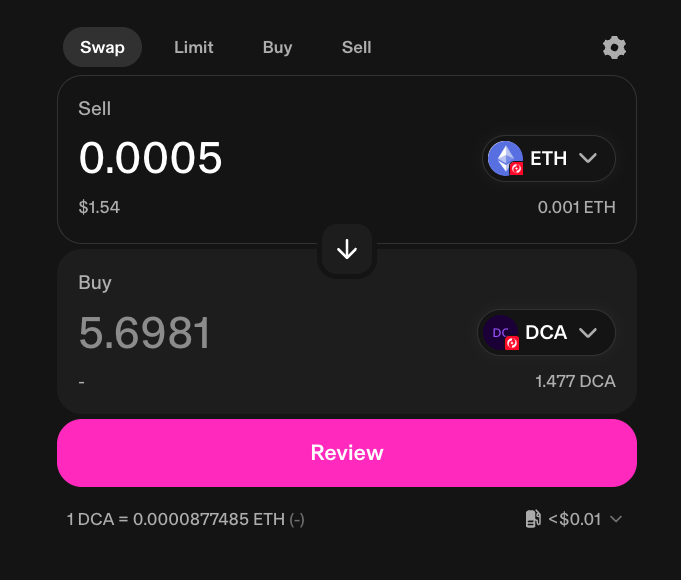
- Go to Uniswap to buy DCA (opens in a new tab, pre-configured for DCA tokens)
- Enter the amount you want to buy (remember, you need equal value of both tokens)
- Review the price and confirm the swap
- Wait for the transaction to complete
- Return to the Super DCA Add Liquidity page
Example Calculation
If you want to provide $200 of liquidity to the USDC-DCA pool, you should have approximately $100 worth of USDC and $100 worth of DCA tokens. Check the current DCA price on Uniswap to calculate how many tokens you need.
3. Choose Your Pool and Click Select
Once you have both tokens ready, review the available pools and select the one you want to provide liquidity to.
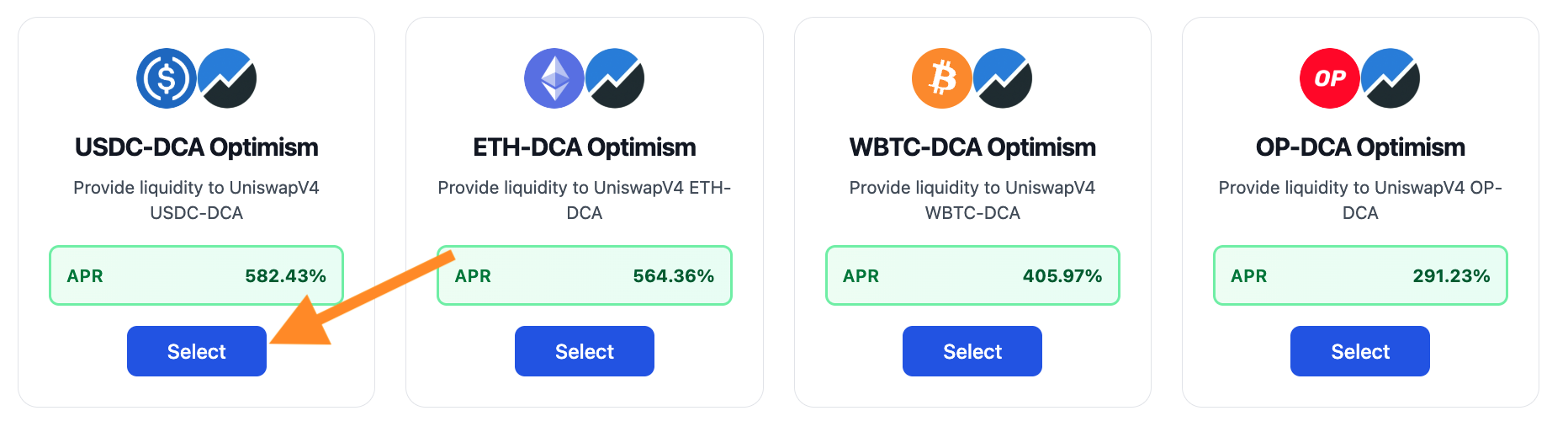
Each pool card shows:
- Token Pair: Which tokens you need to provide (e.g., USDC-DCA)
- Network: Optimism
- APR: Current annual percentage rate for rewards
- Description: Brief info about the pool
Recommendation for Beginners
Start with the USDC-DCA pool on Optimism. USDC is a stablecoin, which means less price volatility and lower risk of impermanent loss. It's the easiest pool to understand and manage.
- Find the pool card for your chosen pair on the Add Liquidity page (e.g., USDC-DCA Optimism)
- Review the APR and pool details
- Click the "Select" button on the pool card
- This will open the Uniswap V4 interface in a new browser tab
Note
The "Select" button takes you to Uniswap's official interface. This is where you'll actually deposit your liquidity. Super DCA provides convenient access, but the liquidity is managed through Uniswap V4.
4. Add Liquidity on Uniswap
Now you'll complete the liquidity provision process on Uniswap V4.
- Go to the Uniswap V4 interface by clicking the "Select" button on the pool card
- Click on the "Add Liquidity" button (screenshot above)
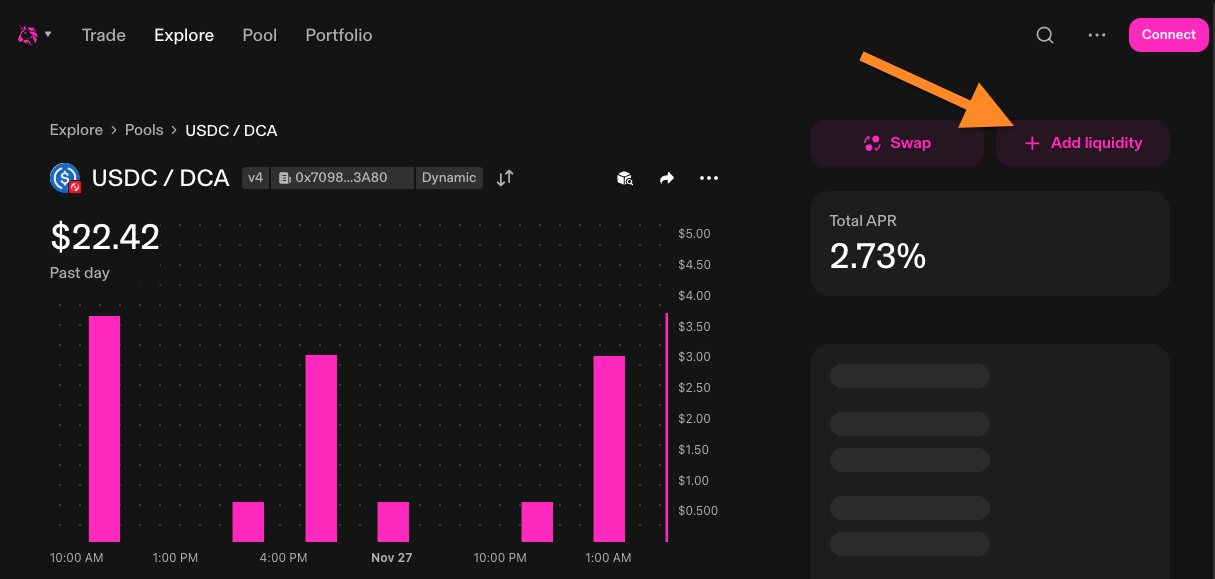
- Verify you're on the correct pool by identifying:
- the token pair (e.g., USDC-DCA)
- the Hook Address: 0x7098Bf7DFF80532aa6bbDB52DF4Ac4992Bec3A80
- The Dynamic Fee Teir
- Click Continue and acknowledge the Hook Risks.
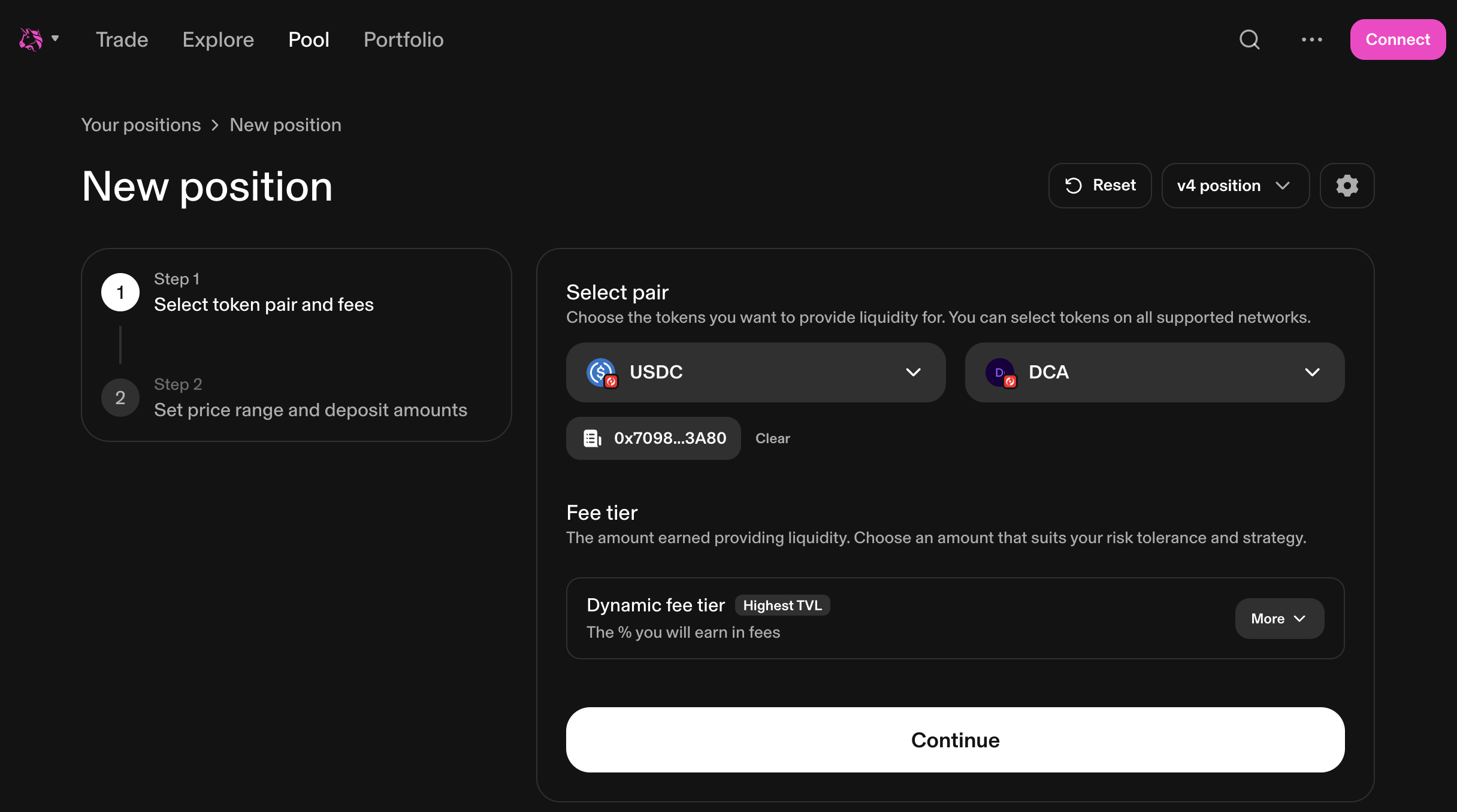
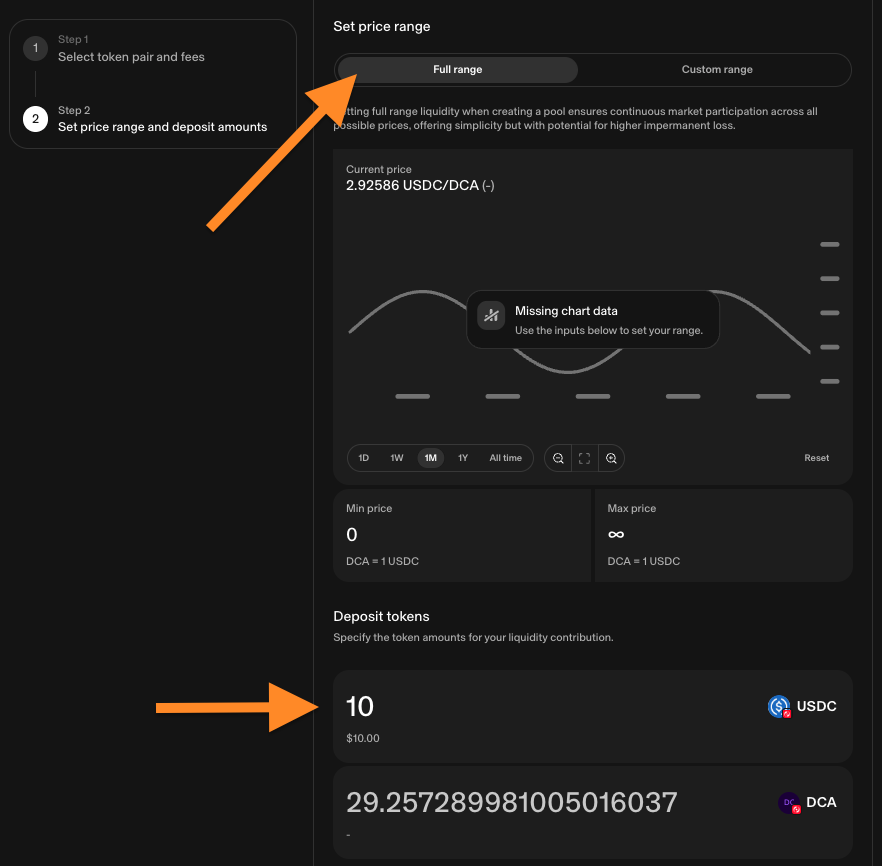
- On the Uniswap interface, you'll see input fields for both tokens
- Enter the amount for one token (e.g., 100 USDC)
- The interface will automatically calculate the required amount of the other token
- Review the price range (most users should use "Full Range" for simplicity, as shown below.)
- Click "Preview" to review your position
- If this is your first time, you'll need to approve both tokens:
- Click "Approve USDC" (or first token) and confirm in wallet
- Wait for approval confirmation
- Click "Approve DCA" (or second token) and confirm in wallet
- Wait for approval confirmation
- Click "Add Liquidity" or "Supply"
- Review the transaction details carefully
- Confirm the transaction in your wallet
- Wait for the transaction to complete (1-2 seconds on Optimism)
About Price Ranges
Uniswap V4 allows you to provide liquidity in specific price ranges. For beginners, we recommend using "Full Range" which means your liquidity is available at all prices. Advanced users can concentrate liquidity in narrower ranges for potentially higher returns (but also higher risk).
Success!
You're now a liquidity provider! Your position will start earning trading fees immediately, and you'll begin accumulating DCA and OP rewards through the Merkl program.
5. Monitor Your Position
After providing liquidity, you can monitor your position and accumulated rewards.
You can track your liquidity position in several places:
- Uniswap: View your position details, fees earned, and manage your liquidity
- Super DCA Add Liquidity page: See your Merkl rewards summary (if you have active positions)
- Merkl website: Detailed breakdown of all your rewards across different pools
6. Claim Your Rewards
Boost Ecosystem Growth!
Periodically claim rewards and compound them back into your liquidity positions to help Super DCA grow!
Optimism Season 8 Growth Grant Rewards on Merkl
OP token rewards accumulate continuously and can be claimed through the Merkl platform.
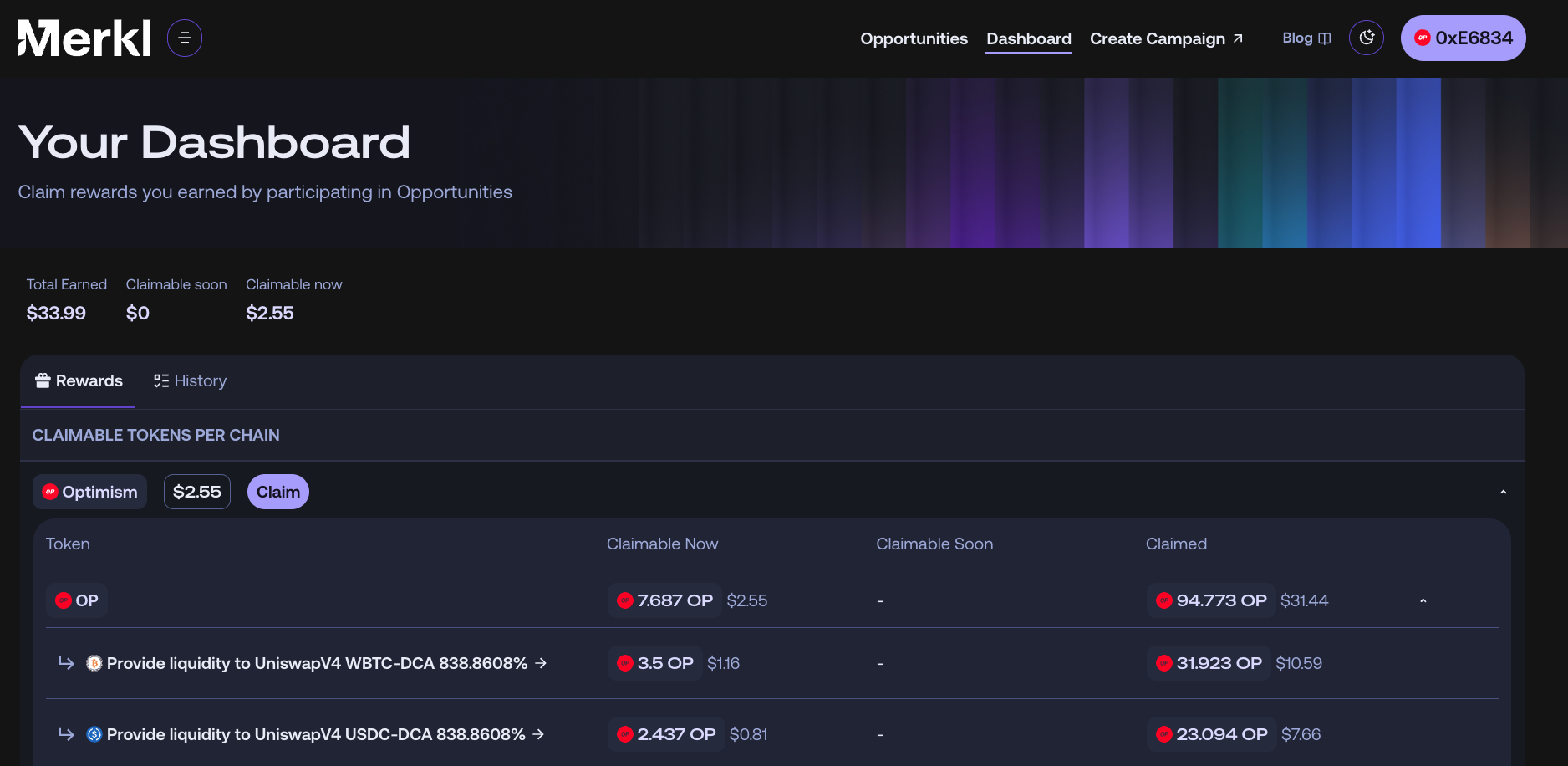
- Access your dashboard on Merkl at app.merkl.xyz/users
- Click the "Claim" button
Super DCA Token Rewards on Uniswap
Super DCA token rewards are distributed to liquidity providers on Uniswap.
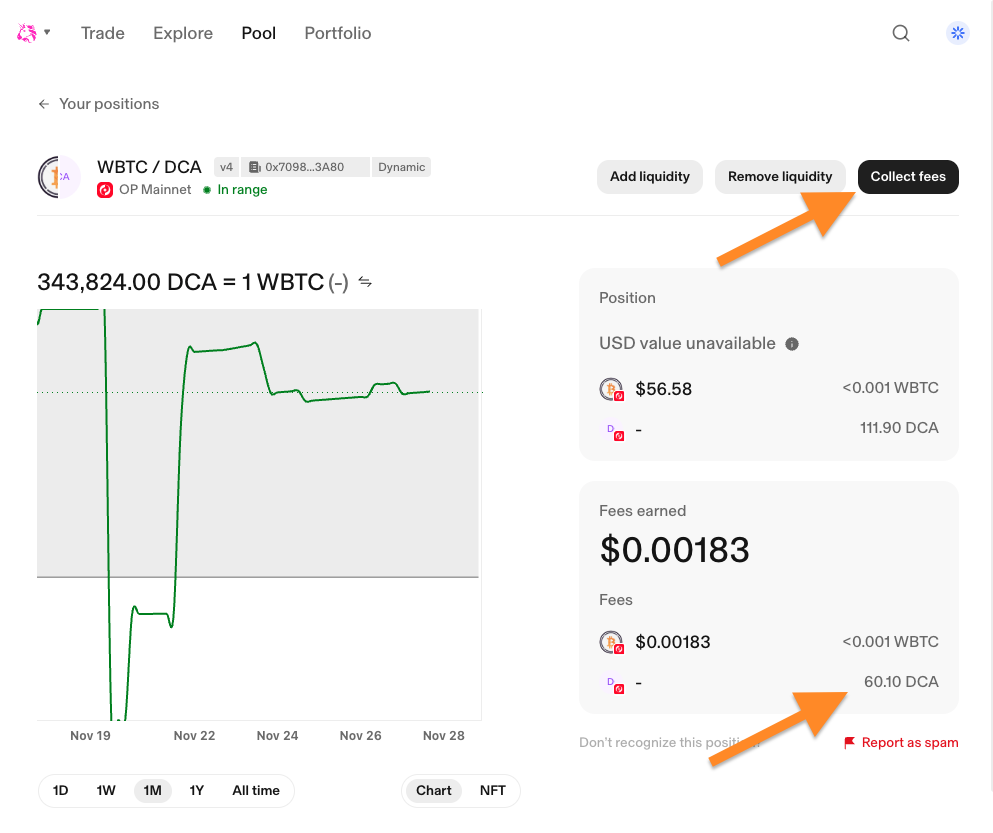
- Go to Uniswap and connect your wallet
- Navigate to Positions
- Find your liquidity position
- Rewards are donated to the pool and show up as fees to collect on your position.
- Click the "Collect Fees" button to claim your rewards.
Tips for Success
Start Small to Learn
If you're new to liquidity provision, start with a small amount (e.g., $50-100) to understand how it works before committing larger amounts. This lets you learn without significant risk.
Check APRs Regularly
Rewards APRs change based on incentive allocations and trading volume. Check the Add Liquidity or Merkl page to see if there are better opportunities in different pools.
Understand Impermanent Loss
When token prices change significantly, you may experience impermanent loss. This is the difference between holding tokens vs. providing liquidity. For stablecoin pairs (like USDC-DCA), this risk is lower. Learn more about impermanent loss at Uniswap's documentation.
No Lock-up Period
Unlike some DeFi protocols, you can add or remove liquidity anytime. There's no minimum time commitment, so you're never locked in. However, staying in longer usually results in better overall returns as you accumulate more rewards.
Diversify Across Pools
Consider providing liquidity to multiple pools to diversify your risk and maximize rewards. Different pools have different risk/reward profiles.
Removing Liquidity
When you want to exit your position and get your tokens back:
- Go to Uniswap and connect your wallet
- Navigate to "Pools" or "Positions"
- Find your liquidity position
- Click "Remove Liquidity"
- Don't forget to claim any remaining rewards on Merkl
Ready to Provide Liquidity?
Now that you understand how liquidity provision works, start earning rewards!